Introduction
Nowadays, much of the online commentary related to Generative AI is focussed on Automated code Generation and rightly so. But Lets look at alternate use case of it.
Traditionally, Business Intelligence (BI) relies on custom-built dashboards and reports that query a data warehouse. This often requires heavy intervention from engineering teams to analyze requirements, develop artifacts, and maintain them over time.
Imagine your data warehouse is built on a SQL-based DBMS with a custom web interface for analytics. Even with this setup, typical challenges remain:
SDLC Bottlenecks: Engineering intervention is required for every ad-hoc report or specific analytical insight.
Rigidity: Slow “Time-to-Market” (GTM) for data-driven decisions due to change management cycles.
What is AI-First Analytics?
AI-First Analytics applies Generative AI to automate analysis, interpret complex datasets, derive instant insights, and provide predictive recommendations.
Apart from Datawarehouse, this can very well be extended for any requirement to perform analytics (for e.g. Logs and Metrics store).
Can Generative AI be used for this purpose?
Recent improvements in Large Language Models (LLMs) have made this a reality, specifically in: - Writing Complex SQL Queries basis real time intelligence provided by Harness (i.e. Schema information, database documentation, type of database) - Visualization - Generating interactive charts and visualizations on-the-fly using MCP/tools - MCPs/tools and skills that form harness around Model to provide real-time intellgence - Emergence of improved Open weight models, that offer better intelligence while allowing deployment in Private cloud or on edge devices
Microsoft has reported approximately 75% accuracy for NLP-to-SQL generation tasks on industry-standard, real-life database.
Why local?
For highly regulated industries, Open source models are worth the look. Progress in Open source Models have made them more accurate and performant. Language models with techniques like quantization can now run locally in Private cloud/Data center. Key advantages are,
- Data Privacy - Data never leaves organization’s private cloud
- Reduced Latency - Local inferencing within private cloud network instead of round trip to public cloud
- Cost Control - Only cost is in infrastructure in terms of VMs, GPUs (if needed)
What is Harness?
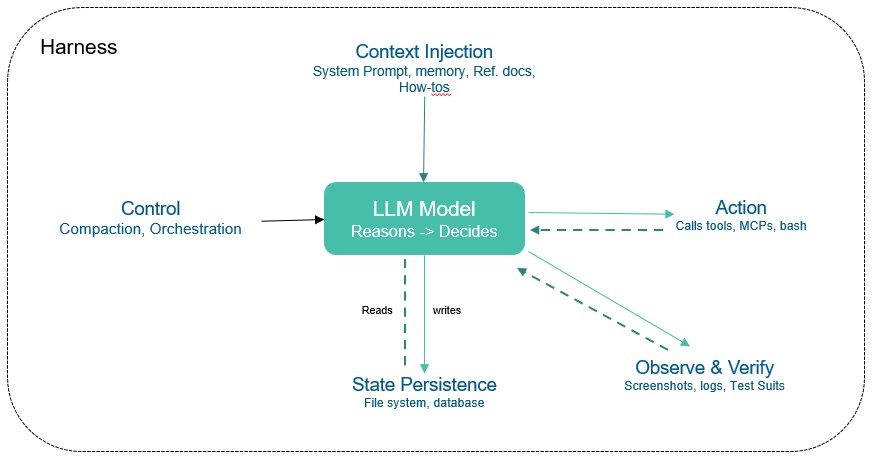
The LLM Model contains intellgence built on public data. However, In the context of Analytics, it needs to have access to private data to gather intelligence and respond accordingly. Additionally, a Model can not execute code, Maintain durable state across interactions, Access real-time intelligence. A harness is every piece of code, configuration, and execution logic that isn’t the model itself.
- A harness  will typically include (but not limited to),
  - **System prompts,  skill files**
  - **Tools, skills, MCP servers**, and their descriptions to access data in Datawarehouse as well as Warehouse data model and related documentation
  - **Bundled infrastructure** (filesystem, sandbox, browser)
  - **Observability** (logs, traces, cost and latency metering
- AI Agent is typically defined as 'Model + Harness'.
In the case of Analytics Agent, below are must-have,
- Field level metadata (column types , constraints etc)
- Documentation (Meaning of fields etc.)
Quality of a Harness (coding agent + “skills” + “Tools” + extensions) can matter as least as much as LLM Model itself.
Below diagram depicts typical harness ,
How
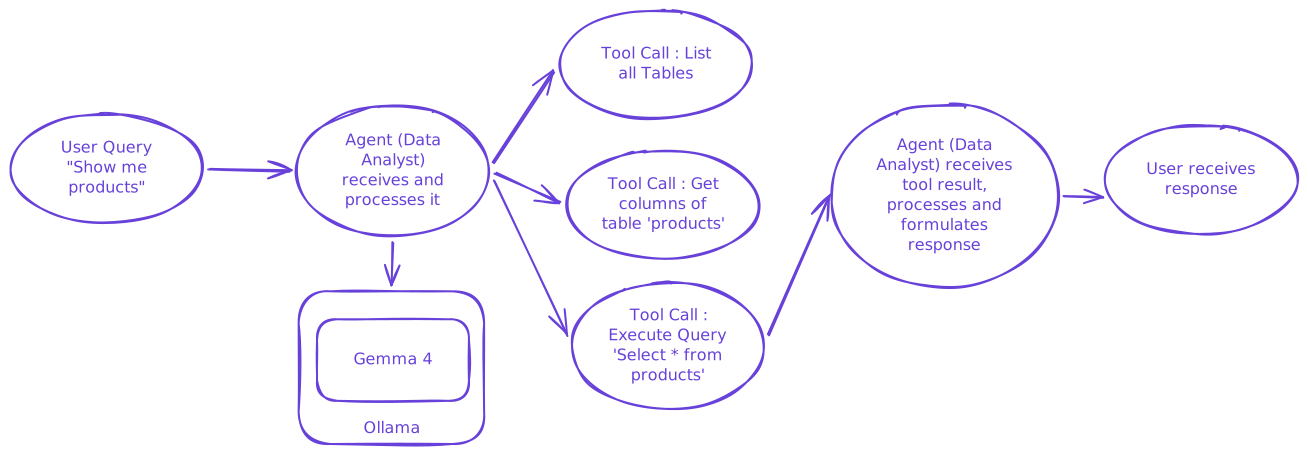
Below diagram summarizes the logical flow ,
While there are multiple approaches to solve a given problem, for the purpose of this article, lets zero-in on below,
Implementation stack
- ADK-Go - An open-source, code-first Go toolkit for building, evaluating, and deploying sophisticated AI agents with flexibility and control.
- Ollama - The easiest way to build with open models (Other alternative is llama.cpp).
- Gemma 4 - Lastest Open multimodal model released by google (as of this writing). Gemma 4 excels at reasoning, coding, tool use, long-context and agentic workflows, and multimodal tasks. It is possible to run it edge devices like Mobile using LiteRT-LM.
- I have used
Gemma4 : Effective 2B (E2B)variant for this and it runs reasonably ok on my laptop with 4 cores and 16GB RAM. It is available here. - SQLite - Dummy database for proof of concept putposes. However, the same concept can be extended for any other database like PostgreSQL , duckDB etc.
Implementation
It uses below tools that allow agents to interact with database,
ListTables - Used by Model to get details on schema of the database.
ListColumns - Used by Model to get details on columns, data types and foreign key relationships
ExecuteQuery - Model uses above tools to construct SQL Query in response to User’s Question and then uses this to execute it.
  ```
      listTableTool, err := functiontool.New(
          functiontool.Config{
              Name:        "list_tables",
              Description: "Retrieves the list of tables and views in database.",
          },
          listTables,
      )

      if err != nil {
          log.Fatalf("Failed to create function tool: %v", err)
      }

      listColumnTool, err := functiontool.New(
          functiontool.Config{
              Name:        "list_columns",
              Description: "Retrieves the list of columns of a table or  view",
          },
          ListColumns,
      )

      if err != nil {
          logger.Fatalf("Failed to create function tool: %v", err)
      }

      execQueryTool, err := functiontool.New(
          functiontool.Config{
              Name:        "execute_query",
              Description: "Executes SQL Query in SQlite dialect and returns result",
          },
          ExecuteQuery,
      )

      if err != nil {
          logger.Fatalf("Failed to create function tool: %v", err)
      }

      dataAnalystwithTools, err := llmagent.New(llmagent.Config{
          Name:        "data_analyst_agent",
          Model:       model,
          Description: "retrieves data from database using available tools.",
          Instruction: `You are a helpful data analyst agent that answers user's quesion regarding data using available tools.
                          The user will provide the query in natual language.
                          1. Use 'list_tables' tool to get details about tables and views in database
                          2. Use the 'list_columns' tool to get details of available columns in table.
                          3. Construct SQL query in SQLite dialect and use the 'execute_query' tool to get the data
                          4. Respond clearly to the user, stating the result shared by the tool.`,
          Tools: []tool.Tool{listTableTool, listColumnTool, execQueryTool},
          // OutputKey: "structured_info_result",
      })
      if err != nil {
          logger.Fatalf("Failed to create analyst agent with tool: %v", err)
      }

      config := &launcher.Config{
          AgentLoader: agent.NewSingleLoader(dataAnalystwithTools),
      }

      l := full.NewLauncher()
      if err = l.Execute(ctx, config, os.Args[1:]); err != nil {
          log.Fatalf("Run failed: %v\n\n%s", err, l.CommandLineSyntax())
      }


  ```
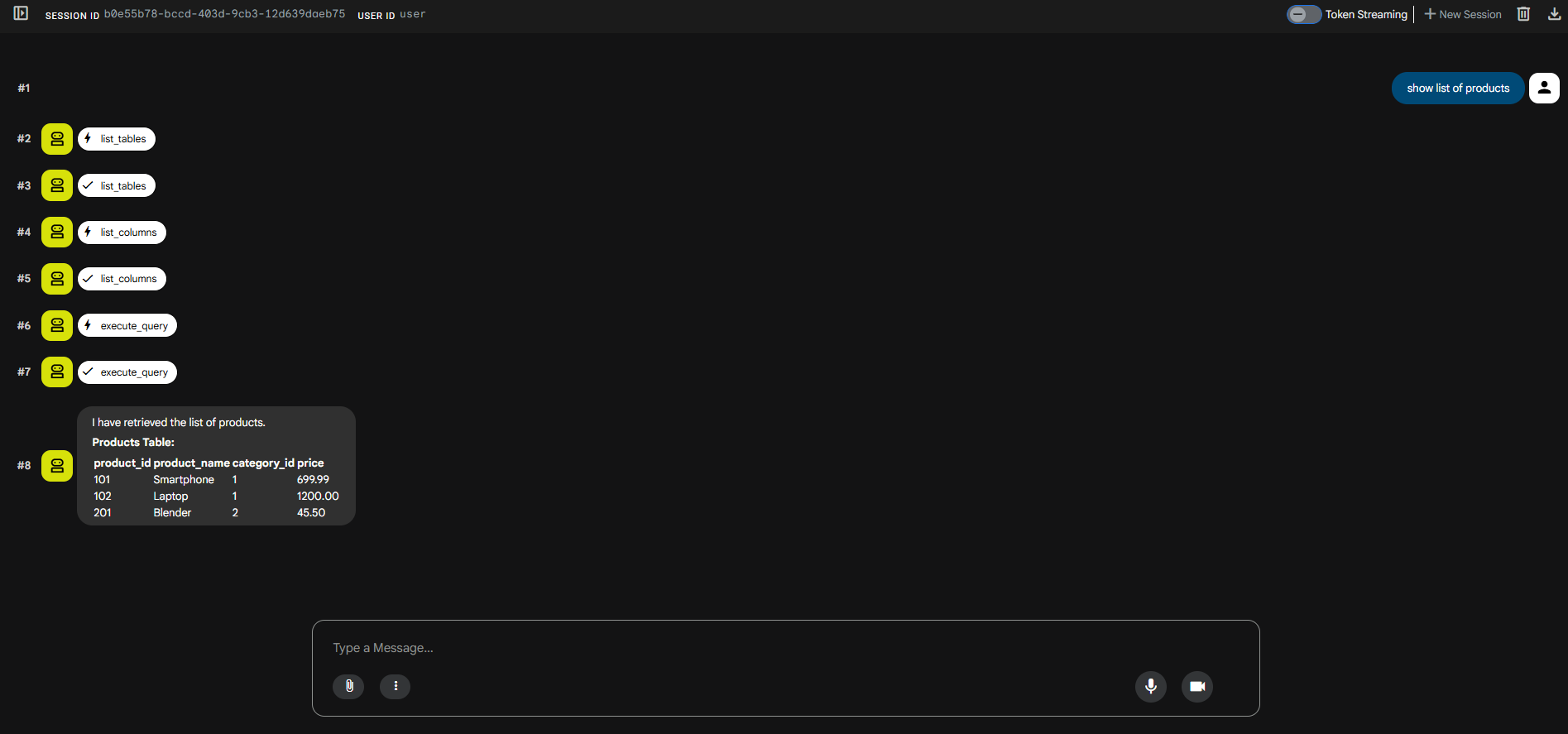
Below is screenshot of Web UI provided by ADK,
Evaluation
The evaluation can leverage approach by LiveSQLbench. It is specifically developed for evaluating LLMs on real-world Text-to-SQL tasks. This is to-do for me and hopefully i will have time to do this and update this blog post. 😀
Summary and the Road Ahead
This approach demonstrates how an AI-First strategy can amplify traditional analytics. However, moving this to production requires additional measures:
- Guard rails to ensure that Model does not execute any DML statements. Refer here for details.
- PII Data Anonymization - Handling PII data before it reaches the model.
- Support for exporting the results to formats like CSV, Excel etc.
- Support for showing charts.
- Sandbox for Testing e.g. Docker
- Error handling
- Evaluation using LiveSQLBench and iterative improvement
As such, companies are reporting that this does not entirely replace traditional Analytics stack (i.e. standardized reports, dashboards etc. ) but amplifies it.
- Helpful Links
Happy Vibe Coding !!